
Introduction
AI programming agents are one of the most rapidly evolving areas of software development. While in 2023 we perceived LLMs as advanced autocomplete, by 2026 they have turned into autonomous agents capable of reading code, running commands, and implementing entire features. According to industry research, by March 2026, 57% of organizations are already using AI agents in production.
In this post, we'll break down the architecture of modern agents, explore approaches to building them — from ready‑made frameworks to building from scratch — and offer practical recommendations.
1. What Is an AI Programming Agent
An AI programming agent is an autonomous system built on top of a large language model (LLM) that can not only generate text but also interact with its environment: read and edit files, run terminal commands, call external APIs, and solve tasks iteratively.
The key difference between an agent and a regular chatbot is the feedback loop. A chatbot answers a question once. An agent receives a task, formulates a plan, takes actions, analyzes the results, and adjusts its approach until the task is solved.
Examples of existing agents: Claude Code (Anthropic), Codex CLI (OpenAI), Cursor Agent, as well as open‑source projects like Claw Code — a reproduction of Claude Code's architecture in Python and Rust.
2. The Fundamental Architecture: The ReAct Loop
All modern programming agents are built on the ReAct (Reasoning + Acting) pattern, introduced in the eponymous paper by Yao et al. (2022). The essence of the pattern is the alternation of reasoning and action stages in a loop:
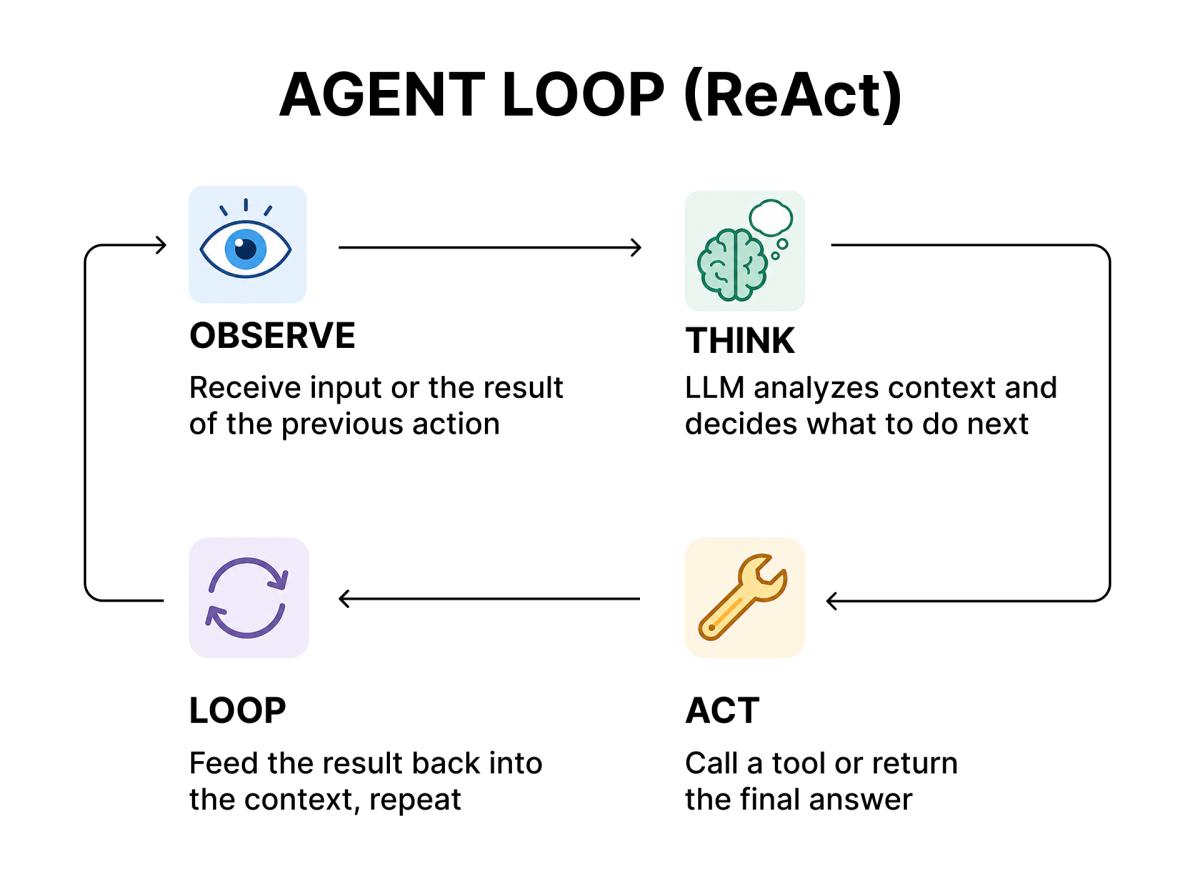
Each iteration follows the format Thought → Action → Observation → Answer. At each step, the LLM receives the entire history of previous stages and decides whether the task is complete — and if not, which tool to call next.
Advantages of ReAct over earlier approaches (such as pure Chain‑of‑Thought):
- traceability of each step,
- easy composition of tools,
- low entry barrier via few‑shot prompting,
- fast iteration without model retraining.
3. The Five Building Blocks of an Agent
To create a working programming agent, you need to implement five key components.
3.1. The Language Model (LLM)
The agent's core is an LLM acting as its "brain". The choice of model determines reasoning quality, instruction‑following ability, and speed.
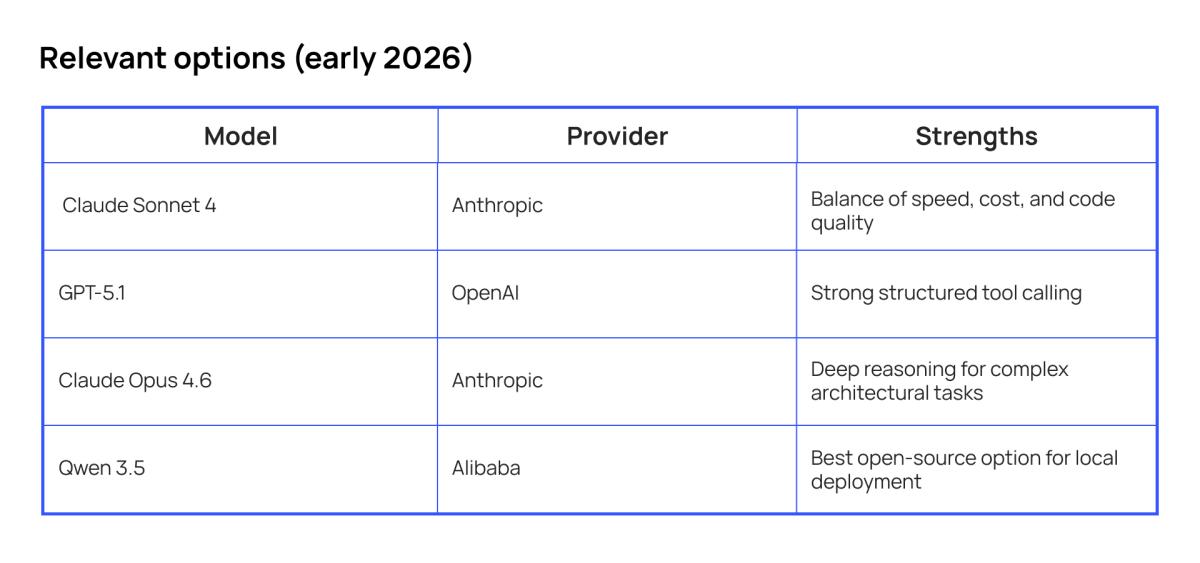
When choosing a model for an agent, it's important to consider not only the overall generation quality but also support for function calling — a mechanism that allows the model to request tool execution in a structured way.
Anthropic and OpenAI implement this mechanism differently: Claude Tool Use provides flexible, model‑driven integration, while OpenAI Function Calling focuses on strict JSON‑schema compliance.
3.2. The Tool System
Tools are functions that the agent can call to interact with the outside world. A minimal set for a coding agent:
read_file— read project files;write_file / edit_file— create and edit files;run_command— execute terminal commands;search— search the codebase (grep, semantic search);list_directory— view the directory structure.
Each tool is described with a JSON schema that is passed to the model along with the system prompt:
{
  "name": "read_file",
  "description": "Read the contents of a file at the given path",
  "parameters": {
    "type": "object",
    "properties": {
      "path": {
        "type": "string",
        "description": "Absolute or relative path to the file"
      }
    },
    "required": ["path"]
  }
}
The model analyzes the tool description and its parameters, forms a JSON call, and the agent loop executes that call and returns the result to the context.
Advanced agents like Claude Code provide up to 40 tools with a permission‑gated system, including Git operations, LSP integration, and web scraping.
3.3. The Agent Loop
The agent loop is the orchestration logic that implements the ReAct cycle. In its minimal form, it's a while loop that:
- Sends the current context (system prompt + message history) to the LLM;
- Parses the model's response — either a text answer or a tool call;
- If it's a tool call, executes it, adds the result to the message history, and returns to step 1;
- If it's a text answer, returns the result to the user.
A minimal Python implementation example:
```python
import anthropic

client = anthropic.Anthropic()

def agent_loop(user_message: str, tools: list, system_prompt: str):
    messages = [{"role": "user", "content": user_message}]

    while True:
        response = client.messages.create(
            model="claude-sonnet-4-20250514",
            max_tokens=4096,
            system=system_prompt,
            tools=tools,
            messages=messages,
        )

        if response.stop_reason == "tool_use":
            tool_call = next(
                b for b in response.content if b.type == "tool_use"
            )
            result = execute_tool(tool_call.name, tool_call.input)
            messages.append({"role": "assistant", "content": response.content})
            messages.append({
                "role": "user",
                "content": [{
                    "type": "tool_result",
                    "tool_use_id": tool_call.id,
                    "content": result,
                }],
            })
        else:
            return response.content[0].text
```
In production, the agent loop is augmented with error handling, iteration limits, response streaming, and stop conditions.
3.4. The Sandbox
An agent executes arbitrary code — which means it needs an isolated execution environment. Without a sandbox, an agent could accidentally (or intentionally, via prompt injection) damage the system.
Three main levels of isolation:
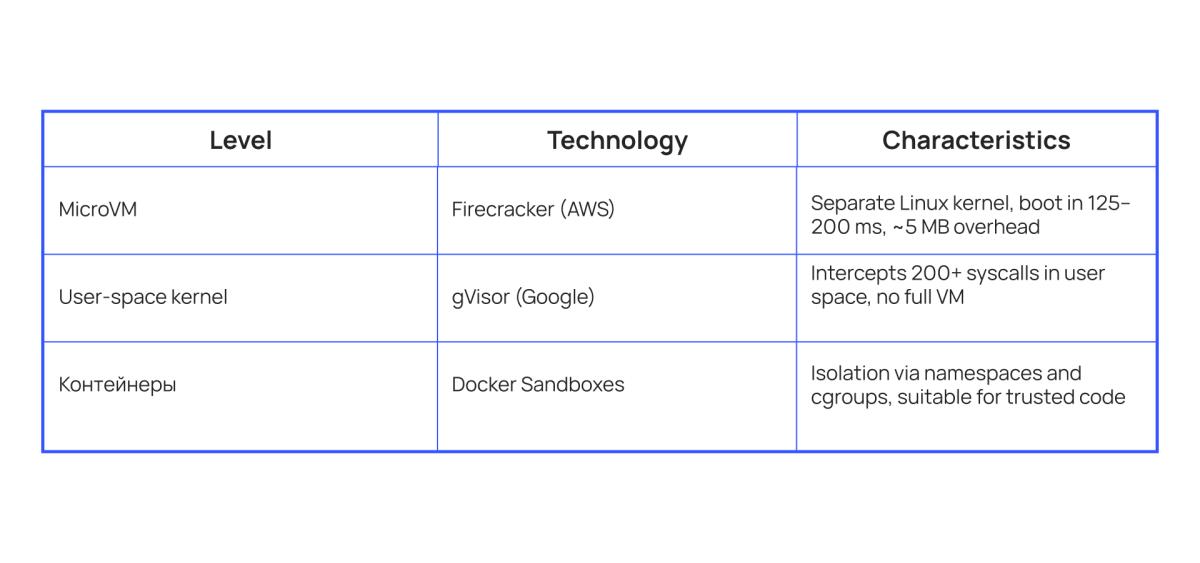
Research indicates that using a sandbox reduces security incidents by approximately 90%. Docker Sandboxes provide isolated environments specifically for AI agents, where only the project working directory is mounted.
3.5. Context Engineering
Context engineering is the discipline of designing the agent's informational environment. As Andrej Karpathy described it: "The subtle art and science of filling the context window with exactly the information needed for the next step."
Five levels of context:
- System instructions — role definitions, rules, constraints;
- User input — the direct request;
- Retrieved knowledge — external data via RAG or search;
- Conversation history — previous turns and accumulated state;
- Agent state — memory, goals, intermediate notes.
Critical findings from research:
- LLM performance degrades as context grows, often sharply deteriorating at 32K–64K tokens;
- The "Lost in the Middle" effect — transformers poorly process information from the middle of a long context;
- A developer with a clean, well‑structured context on a weaker model outperforms a developer with a cluttered context on a stronger model.
Key context engineering patterns:
- compaction — compressing earlier parts of the conversation into brief summaries to free up tokens;
- Just‑in‑Time Retrieval — providing search tools instead of loading all documents upfront;
- structured scratchpads — using scratchpads for the agent's intermediate reasoning.
4. Three Paths to Building an Agent
4.1. Path A: Using Ready‑Made Agents (Zero Code)
When it fits: you need to quickly deploy an AI assistant into your workflow without customization.
Existing solutions — Claude Code, Codex CLI, Cursor, GitHub Copilot — already implement all five building blocks. They can be used "out of the box", customizing behavior through system prompts and project rules.
Pros: zero development cost, proven architecture, regular updates.
Cons: limited customization, vendor lock‑in, inability to integrate with unique internal systems.
4.2. Path B: Using Frameworks (Low Code)
When it fits: you need custom logic but don't have the resources to build everything from scratch.
Three dominant frameworks:
LangGraph
A project from LangChain (~48K GitHub stars). Models agent workflows as directed graphs with explicit state machines. Nodes represent functions, edges represent transitions, and state is passed as a typed dictionary.
```python
from langgraph.graph import StateGraph, END
from typing import TypedDict

class AgentState(TypedDict):
    messages: list
    current_file: str
    iteration: int

graph = StateGraph(AgentState)
graph.add_node("analyze", analyze_code)
graph.add_node("edit", edit_code)
graph.add_node("test", run_tests)

graph.add_edge("analyze", "edit")
graph.add_edge("edit", "test")
graph.add_conditional_edges("test", check_tests, {
    "pass": END,
    "fail": "analyze",
})
```
Strengths: built‑in checkpoints, high observability, persistence via PostgreSQL/Redis, leader in production deployments (~40%).
Weaknesses: verbose boilerplate even for simple pipelines.
AutoGen
A Microsoft Research project (~37K stars). Uses a conversation‑based architecture: agents exchange messages like participants in a group chat. Intuitive for multi‑agent scenarios but less deterministic than LangGraph.
Strengths: natural interaction model, convenient for prototyping.
Weaknesses: less predictable behavior.
CrewAI
A project with ~29K stars. Uses role‑based orchestration: agents are defined with specific roles (Researcher, Developer, Analyst), and a "crew" abstraction manages task dependencies.
```python
from crewai import Agent, Task, Crew

researcher = Agent(
    role="Code Researcher",
    goal="Analyze codebase architecture and find relevant files",
    backstory="Expert in code analysis and software architecture",
)

developer = Agent(
    role="Developer",
    goal="Implement changes based on research findings",
    backstory="Senior developer with expertise in clean code",
)

research_task = Task(
    description="Analyze the authentication module",
    agent=researcher,
)

dev_task = Task(
    description="Refactor the auth module based on findings",
    agent=developer,
)

crew = Crew(agents=[researcher, developer], tasks=[research_task, dev_task])
result = crew.kickoff()
```
Strengths: fastest path to a prototype, low entry barrier, intuitive mental model.
Weaknesses: difficulty with long and complex workflows.
Comparison Table
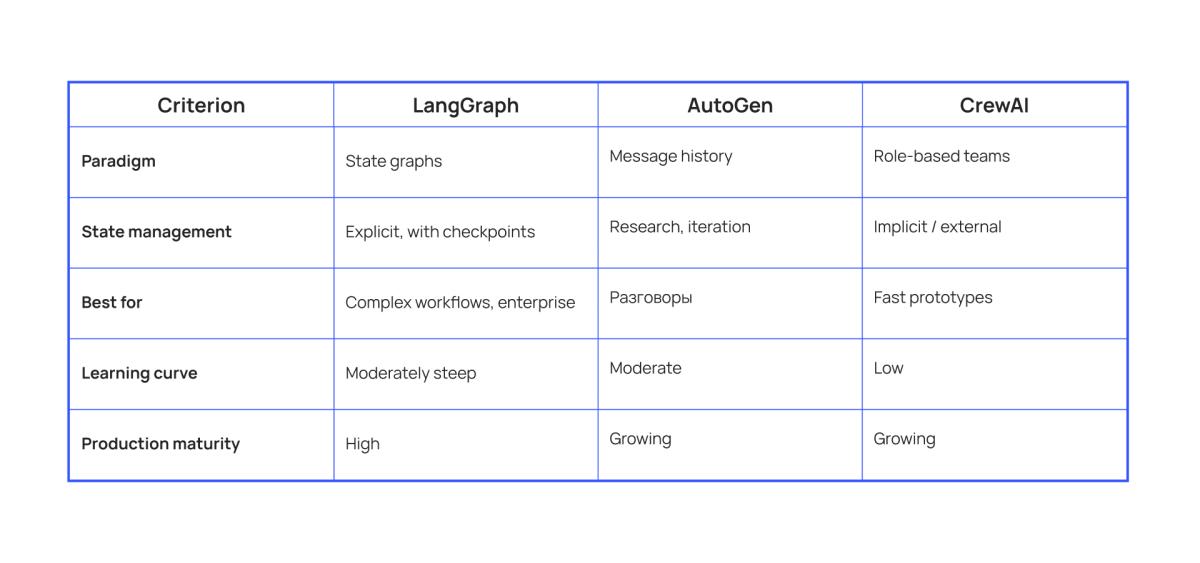
For most developers, the framework path offers the optimal balance of flexibility and speed.
4.3. Path C: Building from Scratch (Full Control)
When it fits: you need complete control or frameworks introduce unacceptable overhead.
When building an agent from scratch, you work directly with the LLM provider's API and implement the entire agent loop yourself. This offers maximum flexibility but requires significant effort.
Typical architecture:
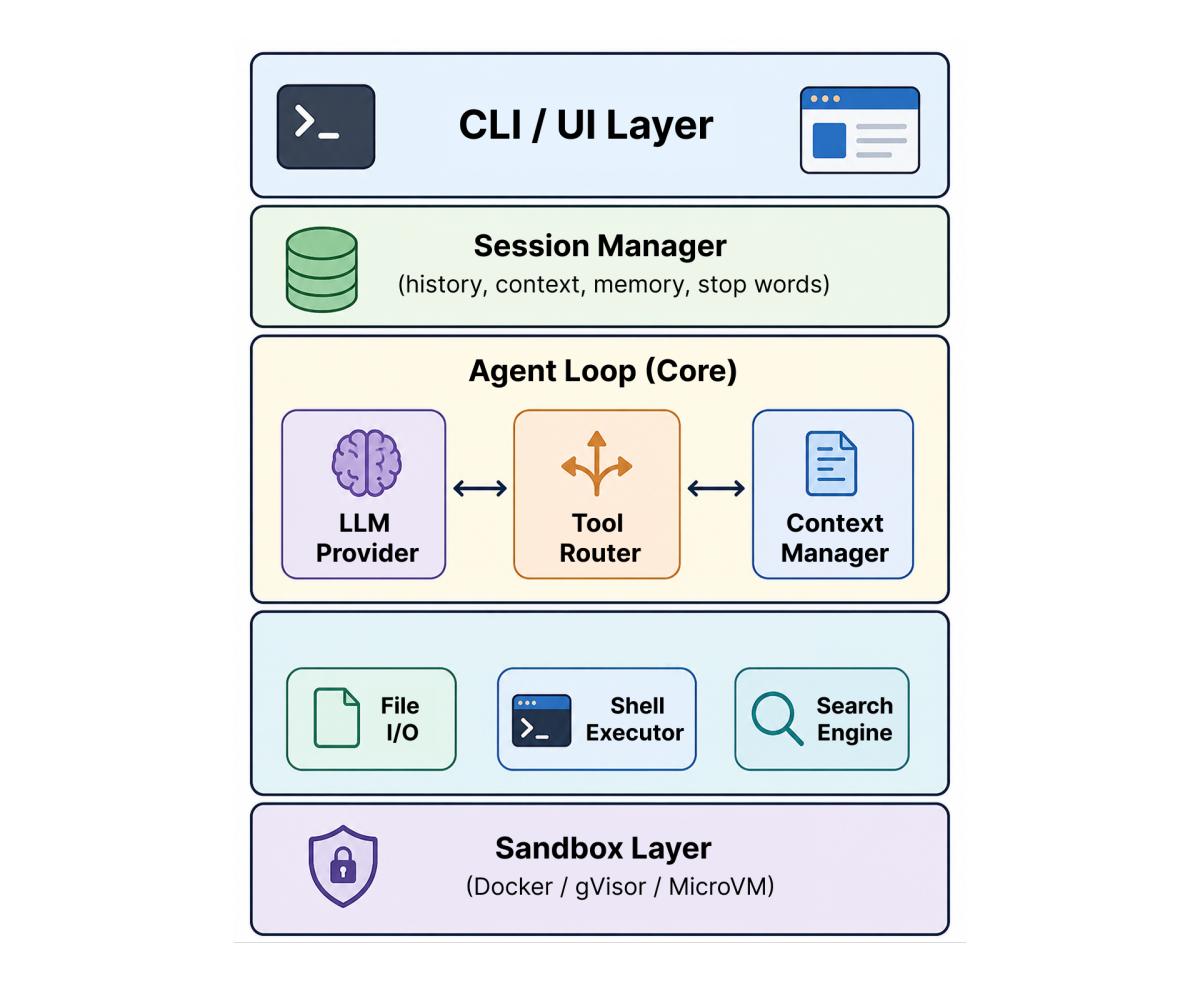
Key components to implement yourself:
- abstraction over model APIs (LLM Provider),
- tool call routing and validation (Tool Router),
- context window management with history compaction (Context Manager),
- session persistence (Session Manager),
- isolated code execution (Sandbox).
5. Model Context Protocol (MCP): A Standard for Tool Integration
The Model Context Protocol (MCP) deserves special attention. It is an open protocol that standardizes the integration of LLM applications with external data sources and tools.
MCP defines a single interface and solves the "M×N integration problem": all parties support one protocol.
Key protocol characteristics:
- message format: JSON‑RPC 2.0;
- connection type: stateful connections with capability negotiation;
- server capabilities: resources (context and data), prompts (templates), tools (callable functions);
- current specification version: 2025‑11‑25.
MCP servers already exist for the file system, GitHub, Playwright, databases, Slack, Jira, and dozens of other services. This means that when building an agent, you don't need to write integrations from scratch — you can use ready‑made MCP servers.
MCP support is already built into Claude Code, Cursor, Codex CLI, and most modern agent frameworks. Ready‑made MCP servers are plugged in via simple JSON configuration.
6. Multi‑Agent Architectures
For complex tasks, a single agent may not be enough. Multi‑agent architectures distribute work across specialized agents.
The Orchestrator + Specialists Pattern
A central orchestrator agent decomposes the task and delegates subtasks to specialized agents:
- Planner Agent — analyzes the task and creates a plan;
- Researcher Agent — studies the codebase and finds relevant files;
- Coder Agent — implements code changes;
- Reviewer Agent — checks changes for quality and security;
- Tester Agent — runs tests and analyzes results.
The Parallel Subagent Pattern
Claude Code implements this pattern: the main agent spawns subagents, each working in an independent context window. This allows different parts of the codebase to be explored in parallel without cluttering the main context.
7. Practical Recommendations
Start small
Don't try to build a universal agent all at once. Start with three tools (read_file, write_file, run_command) and a simple loop. Add functionality iteratively.
Invest in context engineering
Context quality matters more than model power. Four common context engineering mistakes:
- Context Poisoning — hallucinations taken as truth propagate through the session;
- Context Distraction — too much information overwhelms the model's focus;
- Context Confusion — irrelevant information influences decisions;
- Context Clash — contradictory information inside the context.
Don't cut corners on security
A sandbox is not an optional component. Any agent that executes code must work in an isolated environment.
Ensure observability
Log every step of the agent loop: the LLM request, the model's response, the tool call, and the execution result. Without this, debugging an agent becomes guesswork.
The choice of framework matters less than the infrastructure
It is the infrastructure — state persistence, retries, monitoring — that determines an agent's reliability in production.
8. What's Next
The field of agentic programming is evolving rapidly. Key trends:
-
standardization via MCP — a common protocol lowers the barrier to entry;
-
specialized models — models optimized for agentic execution;
-
background agents — autonomous work with state persistence between sessions;
-
agent composition — assembling complex systems from simple agents.
Building your own agent is an engineering task with a clear set of components and proven approaches. Understanding the fundamental architecture — the ReAct loop, the tool system, context engineering, and the sandbox — will allow you to build an effective assistant regardless of the path you choose.
References
1. Yao, S., Zhao, J., Yu, D., et al. (2022). *ReAct: Synergizing Reasoning and Acting in Language Models*. arXiv:2210.03629. https://arxiv.org/abs/2210.03629
2. Model Context Protocol — Official Specification (2025-11-25). https://modelcontextprotocol.io/specification/latest
3. Model Context Protocol — GitHub Repository (7 758 звёзд, 340 контрибьюторов). https://github.com/modelcontextprotocol/specification
4. Anthropic. *Claude Tool Use Documentation*. https://docs.anthropic.com/en/docs/build-with-claude/tool-use
5. OpenAI. *Function Calling in the OpenAI API*. https://platform.openai.com/docs/guides/function-calling/
6. LangGraph — Official Documentation. https://langchain-ai.github.io/langgraph/
7. Microsoft AutoGen — GitHub Repository. https://github.com/microsoft/autogen
8. CrewAI — Official Documentation. https://docs.crewai.com/
9. Docker Sandboxes for Coding Agents. https://docker.com/products/docker-sandboxes/
10. gVisor — Container Security Platform (Google). https://www.gvisor.dev/
11. Claw Code — Open-Source AI Coding Agent Framework. https://claw-code.codes/
12. Codex CLI Architecture Survey (2026). https://yage.ai/share/codex-cli-internals-survey-en-20260314.html
13. AI Agent Frameworks Comparison (2026). https://ibuidl.org/blog/ai-agent-frameworks-comparison-20260310
